Tuesday, April 9, 2019

Thing 6: Digital Storytelling

While I do a lot of media creation and digital storytelling with students, this is an ever changing and growing arena of technology tools, so I always welcome an opportunity to explore new options and dig deeper into the creation capacity of familiar tools.  For this assignment I focused on the solutions for student creation being rolled out in Adobe Spark, and creating within Powtoons. 
This week I rolled out a project in a Spanish 7 class in which students were asked to create Travel Videos to entice tourists to various Spanish speaking countries using the five senses.  The teacher had used Adobe Spark in the past, but at that time the regulations within the program meant she had to allow students access to her account for them to create, because most of the 7th graders were still 12 years old.  Recently Adobe Spark created an Education option, allowing schools to connect their student Google accounts, which solves that student access challenge.  I worked with my tech department to make this connection possible and the rollout to students went very smoothly.  They are in the creation phase now, and will be heavily relying on the resources I provide through my
Media Creation Tools document.  This is a document that I leave intentionally varied and broad to allow for maximum student empowerment of tool selection in their learning process.
In addition to Adobe Spark, I used Powtoons to create a promotional video for our April Literacy program of Bookopoly.  This is a tool that I have used in the past, but I usually suggest it for a certain style of video and I wanted to explore how versatile it could be.  Creating this video gave me a small glimpse into the potential for creativity and opened up other projects that I do to potentially using Powtoons. 

Thing 20: Social Reading

I recently began the ISTE Certification process and one of our initial assignments had us crowdsourcing for resources to address diverse learning needs.   As I began this assignment for Crowdsourcing of Diverse Learning Resources I knew there were several ways that I could approach it.  I decided to specifically focus on diversity in a cultural sense, as it is something that I have been exploring through my role both in the library and the purchase of books and as a member of our Diversity Committee at Lake George.  This fits nicely with the ISTE Collaborator strand which explicitly develops "cultural competency when communicating with students, parents and colleagues", as well as inspiring me to utilize some of the tools I have been exploring for social reading.
With all of the new tools out there I have been wanting to utilize some of the curation elements to connect to our reading culture.  I gathered titles to curate for student access that would reflect the theme of cultural diversity.  I used two methods of curation, with Destiny Collections and Sora, creating two points of access for students to explore diverse titles.  This will allow them to be empowered and self-directed in their selection of books to expand their cultural understanding and experiences.  The curation of these titles is a step in our process of developing cultural competency within our school community.  The tools I explored provide a natural access point for students.  These are resources and tools I will use again for collaboration and curation.  Now that I have learned the process and potential I look forward to seeing the student engagement.
My next steps are to increase the activity of our avid readers on Goodreads.  I have a handful of students who use it to write and share reviews as well as keep track of their reading lives.  This has been a great method of collaboration and communication with them, but I want to spread that usage.  Right now I am working with a small group of readers participating in a Battle of the Books reunion, and see the potential of getting them connected in that way.  

Wednesday, March 6, 2019

Thing 12: News Literacy

I really enjoyed the News Literacy Project!  I went through their collection of free lessons, taking them as a student, and thought they were very well done.  Even the vocabulary and context they presented will be valuable tools to use with students.  I always question how prepared I am to teach lessons on fake news, which after doing these lessons I will call misinformation and disinformation, but going through these lessons gave me more confidence in my own understanding and ability to identify valid stories and sources. 
Bridget and I are also preparing for our second annual "Coffee Click", a time when we meet with parents to educate them on a timely topic that their students are learning about.  Last year we covered eReading, and focused on OverDrive.  This year we would like to tackle the topic of Sifting through all of the information out there and being prepared to identify what is real.  This is particularly timely right now, in light of the Momo challenge, and school districts jumping to share information that they themselves had not verified.  We will use many of the resources explored through this "thing".  Both of us have ordered the new book by Jennifer Lagarde, Fact vs. Fiction, and we are considering using that for the foundation of this Coffee Click.  I am also considering sending parents to the News Literacy Project for a follow up lesson after we meet. 
As the advisor for our student newspaper I also am looking for opportunities to share the resources here with my student reporters.  I am hoping to use the Pulitzer Center lessons on "World Press Freedom Day", and inspire my newspaper students to create some school-wide activities.  I shared many of the lessons from the Pulitzer Center with individual teachers as well. 
I have spent a lot of time working my way through the resources here, and look forward to continuing to implement them integrated into lessons throughout the year.  One example that I will use immediately is a quick tool for evaluating websites, which I will be using this week with 7th grade students doing science research.  I created this as a Google Form, and will present it as an exit ticket type activity, which will allow us to stimulate good conversation and raise awareness as students search, without creating a labor intensive process. 

Monday, February 11, 2019

Thing 5: Audio Tools

I have been doing audio book reviews with 8th graders for years, but this thing inspired me to take that to the next level.  I always called them "podcasts", but they really weren't because it was never gathered to be presented that way.  I have previously been sharing them through QR Codes on books, which was effective, but limited access to physical presence in the library.  Through this "thing" I explored Anchor, and have so far published three episodes of our "LG Reads" podcast.  This allows me to share the student reviews through our library social media, as well as providing access on the books through QR Codes. 

While working through this process I also explored the tools Beautiful Audio Editor (Chrome Extension) and Clyp: https://clyp.it/ , which I may use in the future instead of Audacity. I was able to provide them as options for seniors doing interactive exhibits this month, however none of the students opted to try them, instead using QuickTime to create screencasts. One of my frustrations with audio is that we can't embed it into Google Slides, which would increase the ease of access and sharing to a broader audience.
As I explore tools for creation of audio, and ideas for sharing/ presenting audio, I have also made it a point to explore quality audio content by subscribing to a few Podcasts myself. I have been enjoying "So We've Been Thinking" and "Hey YA", although the challenge continues to be finding time to enjoy this media type, as it isn't my "go-to" in the way that blogs and visual content would be.

Thing 3: Photo Fun

My goal for this thing was to explore more potential on Social Media for the library.  We have a Facebook, Twitter, SnapChat and Instagram, but I am not very consistent in how I use them.  Part of this is the time factor, which is always going to be a factor, but part of it is also being purposeful in reaching my audience through these different tools.

I really appreciated the article that said, "Facebook is old school, Twitter is succinct, Instagram is highly polished and curated but Snapchat is silly and goofy and fun."  I typically share all of my posts across platforms, but this got me think not only about there being different audiences, but also a different purpose within these medias.
Since then I have been asking myself more about the type of content and tone/ mood being shared through each.  I would say that Facebook reaches more of an adult audience, in particular our school community (teachers and parents, etc.), Twitter is my professional platform where I connect with other educators both within and outside of my school, SnapChat and Instagram are more where students live.  Even within these medias I should have a different type of presence though- lighter on SnapChat and more polished on Instagram.
To this end, I have spent some time playing- especially on SnapChat.  I created a Filter and experimented with sharing it for others to download- that could be a lot of fun incorporated into some broader contest or interactive board, so I will revisit it when we do Bookopoly later this spring.

Some of the ideas I have for hashtags for rotating/ intentionally presenting pictures are listed below:
Book Snaps
#LGMakers
#LGReads
#EmpoweredLearner
Global Connections


Friday, June 16, 2017

Online Learning & DIY PD

I LOVE learning!  The process of exploring new information, developing new perspectives and
constructing knowledge is exciting.  I love hearing from other professionals and being inspired by their innovative ideas, so this was a natural extension of things that I make it a habit of doing.  I loved the idea from Joyce Valenza to create an infographic about my professional learning community to keep visible to remind myself and model for others.  I plan to laminate this and keep it next to my desk and use as the cover of my school binder.  Creating this also gave me the bonus opportunity to use The Noun Project website to download icons.
This year I have developed my Twitter community, using TweetDeck to better organize and curate my conversations.  I have also begun participating in Twitter Chats, and love these!!  I got started with the #2jennsbookclub first, and have since explored a variety of these chats moderated by organizations and people I follow, such as Future Ready Libraries, Jonathan Werner, and EdTech Teachers.
I am really excited about the offerings of BloomBoard.  I set up an account, saved multiple collections, and have started working through some of these.  The design of their Micro-Credentials program has also given me a lot of food for thought, and I am going to incorporate some of the structure they use in the Professional Learning courses I am offering at our school.
Webinars are another great way to expand learning opportunities, and there are so many to choose from out there!  I participated in one last night, hosted by the Future Ready Schools, on Hacking PBL.  There were some great, practical ideas shared.  I especially appreciated the conversation about assessment of projects and the tool they shared, called the "Progress Assessment Tool".  It is such a simple concept, but as I am currently wrestling with the place of grades and developing better models of feedback, this was very timely.
That's what I love about online learning and DIY PD, there is always something new to inspire us and take us to the next step in our thinking.

Thursday, June 8, 2017

Resource Guides

Faculty Newsletters- Keeping Up!
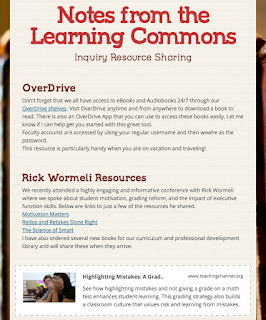
I have been using Smore to create faculty newsletters for awhile now, but keeping up with gathering resources and sharing them is always a challenge.  Reading through the resources for this Thing made me connect the purposes of some tools that I use, but don't maximize for this purpose.  I use Feedly to organize my blogs, but I often neglect reading these, and then when I do read them there are so many that I get overwhelmed.  When I find something good to share I often forget to share it, because I'm not in "sharing mode" at that moment.  It seems so simple, but this Thing prompted me to schedule a time to read my Feedly each week, with a Smore open.
As I read through the blogs and explore new resources and ideas I create headings for anything that I think should be shared with our faculty.  I don't try to create the Smore at that time, but just gathering the ideas and resources.  Then, approximately once a month, I go back and write the full articles with links to resources, and share that with faculty.  This isn't a revolutionary idea, but it has allowed me to maximize the usefulness and efficiency of tools that I have been using.

Student Resource

This year I was looking for a solution to better support students with a research project in a class where it is difficult to schedule "in class" lesson time.  The teacher was willing to give me one day to launch the project with her, but I wanted to better support them with ongoing resources.  In order to do this I decided to use Google Sites to create a webpage of resources.  I wrote about using Google Sites in another blog post, but here I want to discuss how I gathered and organized resources.   I often organize and share resources with students through their classroom management site, Google Classroom, etc., but in this case I wanted to have a resource that was complete and could stand alone, and reflect the process and organization.  I created the I Search Project site with pages for each element of the paper and process.  This was a new type of project for them, but the elements drew on skills that I had worked on with them previously, so I wanted to make those connections.  I balanced new tools with familiar ones and packaged them in the language they would be using for this project.  It was a challenge to think about how they would be using these tools without direct instruction, but it made me really reflect on the usefulness and purpose of different tools.  I also tried to provide a variety of media types including videos, graphic organizers, and written explanation to benefit all student learning needs.  I really liked this process because of the reflective element, and the product feels like having a ready made tool kit.  I think that in the future I would like to create more of these resource sites, even when I will be more involved in the process, because it presents the resources in an easy to use and organized way.