I have been doing audio book reviews with 8th graders for years, but this thing inspired me to take that to the next level. I always called them "podcasts", but they really weren't because it was never gathered to be presented that way. I have previously been sharing them through QR Codes on books, which was effective, but limited access to physical presence in the library. Through this "thing" I explored Anchor, and have so far published three episodes of our "LG Reads" podcast. This allows me to share the student reviews through our library social media, as well as providing access on the books through QR Codes.
While working through this process I also explored the tools Beautiful Audio Editor (Chrome Extension) and Clyp: https://clyp.it/ , which I may use in the future instead of Audacity. I was able to provide them as options for seniors doing interactive exhibits this month, however none of the students opted to try them, instead using QuickTime to create screencasts. One of my frustrations with audio is that we can't embed it into Google Slides, which would increase the ease of access and sharing to a broader audience.
As I explore tools for creation of audio, and ideas for sharing/ presenting audio, I have also made it a point to explore quality audio content by subscribing to a few Podcasts myself. I have been enjoying "So We've Been Thinking" and "Hey YA", although the challenge continues to be finding time to enjoy this media type, as it isn't my "go-to" in the way that blogs and visual content would be.
Monday, February 11, 2019

Thing 3: Photo Fun
 My goal for this thing was to explore more potential on Social Media for the library. We have a Facebook, Twitter, SnapChat and Instagram, but I am not very consistent in how I use them. Part of this is the time factor, which is always going to be a factor, but part of it is also being purposeful in reaching my audience through these different tools.
I really appreciated the article that said, "Facebook is old school, Twitter is succinct, Instagram is highly polished and curated but Snapchat is silly and goofy and fun." I typically share all of my posts across platforms, but this got me think not only about there being different audiences, but also a different purpose within these medias.
Since then I have been asking myself more about the type of content and tone/ mood being shared through each. I would say that Facebook reaches more of an adult audience, in particular our school community (teachers and parents, etc.), Twitter is my professional platform where I connect with other educators both within and outside of my school, SnapChat and Instagram are more where students live. Even within these medias I should have a different type of presence though- lighter on SnapChat and more polished on Instagram.

Some of the ideas I have for hashtags for rotating/ intentionally presenting pictures are listed below:
Book Snaps
#LGMakers
#LGReads
#EmpoweredLearner
Global Connections
Friday, June 16, 2017
Online Learning & DIY PD
 I LOVE learning! The process of exploring new information, developing new perspectives and
 This year I have developed my Twitter community, using TweetDeck to better organize and curate my conversations. I have also begun participating in Twitter Chats, and love these!! I got started with the #2jennsbookclub first, and have since explored a variety of these chats moderated by organizations and people I follow, such as Future Ready Libraries, Jonathan Werner, and EdTech Teachers.
I am really excited about the offerings of BloomBoard. I set up an account, saved multiple collections, and have started working through some of these. The design of their Micro-Credentials program has also given me a lot of food for thought, and I am going to incorporate some of the structure they use in the Professional Learning courses I am offering at our school.

That's what I love about online learning and DIY PD, there is always something new to inspire us and take us to the next step in our thinking.
Thursday, June 8, 2017
Resource Guides
Faculty Newsletters- Keeping Up!
 I have been using Smore to create faculty newsletters for awhile now, but keeping up with gathering resources and sharing them is always a challenge. Reading through the resources for this Thing made me connect the purposes of some tools that I use, but don't maximize for this purpose. I use Feedly to organize my blogs, but I often neglect reading these, and then when I do read them there are so many that I get overwhelmed. When I find something good to share I often forget to share it, because I'm not in "sharing mode" at that moment. It seems so simple, but this Thing prompted me to schedule a time to read my Feedly each week, with a Smore open.
 As I read through the blogs and explore new resources and ideas I create headings for anything that I think should be shared with our faculty. I don't try to create the Smore at that time, but just gathering the ideas and resources. Then, approximately once a month, I go back and write the full articles with links to resources, and share that with faculty. This isn't a revolutionary idea, but it has allowed me to maximize the usefulness and efficiency of tools that I have been using.
Student Resource
This year I was looking for a solution to better support students with a research project in a class where it is difficult to schedule "in class" lesson time. The teacher was willing to give me one day to launch the project with her, but I wanted to better support them with ongoing resources. In order to do this I decided to use Google Sites to create a webpage of resources. I wrote about using Google Sites in another blog post, but here I want to discuss how I gathered and organized resources. I often organize and share resources with students through their classroom management site, Google Classroom, etc., but in this case I wanted to have a resource that was complete and could stand alone, and reflect the process and organization. I created the I Search Project site with pages for each element of the paper and process. This was a new type of project for them, but the elements drew on skills that I had worked on with them previously, so I wanted to make those connections. I balanced new tools with familiar ones and packaged them in the language they would be using for this project. It was a challenge to think about how they would be using these tools without direct instruction, but it made me really reflect on the usefulness and purpose of different tools. I also tried to provide a variety of media types including videos, graphic organizers, and written explanation to benefit all student learning needs. I really liked this process because of the reflective element, and the product feels like having a ready made tool kit. I think that in the future I would like to create more of these resource sites, even when I will be more involved in the process, because it presents the resources in an easy to use and organized way.Tuesday, May 16, 2017
Web Presence
I have spent a lot of time in the past few years developing my web presence. This year I didn't want to change the structure of my page, but I wanted to begin taking a look at the Site Analytics, continue developing my presence through social media, and try out Google Sites, so that I can better support students developing sites for instructional purposes.
 Now that I have explored the analytics available and how to access this information, I will begin to capture this each month, along with the other evidence I have committed to gathering. In Weebly, which I use for our Lake George HS Library website, the analytics are very easy to access and read. The first look gives you an immediate sense from the current week, and if you click further you can look a month back, with some additional information broken down into page views, and access points for the page. All of these are useful data to collect, so I appreciate these options.
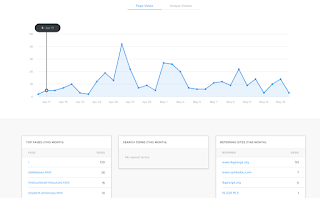 One drawback is that you cannot access the historical data of your analytics for a specific date range though, so I will need to be diligent about access these analytics on a regular basis to make the data collection useful when looking at the year in review. The data that is included will help me to see how the site is being used, and could help me to better harness the possibilities here.
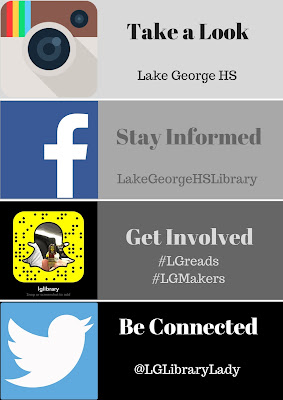 This year I have expanded my social media to include Snapchat, in addition to Facebook, Instagram, and Twitter. I have also gotten better about posting more regularly... although this is always something to work on. Right now I use Hootsuite to manage my posting, although I am looking for another option, which would allow me to post to more places (Hootsuite's free version limits you to 3 social media accounts). My goal is to connect the physical space of the library to the virtual spaces, and connect students to literacy, inquiry, and making throughout. Any time I have programming, events, etc. I include promotion at all of these levels, and try to point them all towards each other. This also allows me to engage with students where they are at, and learn about the technologies they are using. I recently discovered that my Instagram was set to private- I was wondering why I couldn't get them to follow the library there. Since changing that I have begun to develop a following there. The recent addition of Snapchat has allowed me to have students become my teachers, to have them train me on how to best use this app. I am also consistently using the hashtags #LGreads and #LGMakers to highlight what students are doing with literacy and making through our library and school community. All of these elements are to create a strong and unified purpose in our library learning commons environments, both physical and virtual.
 to experience site creation using Google Sites. Creating a site with the tool prepares me to support students when they are using the tool. I had the opportunity to do this a few months ago, when creating a resource site for a 12th grade English project.
Google Sites has come a long way, and does allow for a nice looking site to be created with minimal learning curve. The options are not super extensive, but give you the ability to build a nice clean looking site. The biggest complaint I have is that creating columns in the layout wasn't intuitive, and you had to "force" the system to create that look. Overall, a nice option for site creation though.
One thing that I regret is that I did not explore statistics before the project, so I did not set up Google Analytics. This would have allowed me to see how much seniors used this resource, and therefore better supported them, both this year and classes in the future.
Site Analytics

 One drawback is that you cannot access the historical data of your analytics for a specific date range though, so I will need to be diligent about access these analytics on a regular basis to make the data collection useful when looking at the year in review. The data that is included will help me to see how the site is being used, and could help me to better harness the possibilities here.
 Social Media Presence
 This year I have expanded my social media to include Snapchat, in addition to Facebook, Instagram, and Twitter. I have also gotten better about posting more regularly... although this is always something to work on. Right now I use Hootsuite to manage my posting, although I am looking for another option, which would allow me to post to more places (Hootsuite's free version limits you to 3 social media accounts). My goal is to connect the physical space of the library to the virtual spaces, and connect students to literacy, inquiry, and making throughout. Any time I have programming, events, etc. I include promotion at all of these levels, and try to point them all towards each other. This also allows me to engage with students where they are at, and learn about the technologies they are using. I recently discovered that my Instagram was set to private- I was wondering why I couldn't get them to follow the library there. Since changing that I have begun to develop a following there. The recent addition of Snapchat has allowed me to have students become my teachers, to have them train me on how to best use this app. I am also consistently using the hashtags #LGreads and #LGMakers to highlight what students are doing with literacy and making through our library and school community. All of these elements are to create a strong and unified purpose in our library learning commons environments, both physical and virtual.
Google Sites
Because we are a Google school, and use all of the Google products throughout instruction, I wanted

Google Sites has come a long way, and does allow for a nice looking site to be created with minimal learning curve. The options are not super extensive, but give you the ability to build a nice clean looking site. The biggest complaint I have is that creating columns in the layout wasn't intuitive, and you had to "force" the system to create that look. Overall, a nice option for site creation though.
One thing that I regret is that I did not explore statistics before the project, so I did not set up Google Analytics. This would have allowed me to see how much seniors used this resource, and therefore better supported them, both this year and classes in the future.
There is always something new to learn in building a web presence, and so much possibility for connecting and building community. As with so many aspects of this course, I could get lost in the options and spend hours more, but this gave me a push to try these next steps.
Tuesday, May 9, 2017
MakerSpace: Continued Growth
We have come a long way in our MakerSpace since the inaugural 2014-2015 school year. We started small and made it manageable, so that it could also be sustainable. I am so invested in inquiry instruction and my need to focus on collaborative teaching opportunities that I didn't want to build a MakerSpace and expectations that I couldn't maintain. I believe that this progression has actually allowed our MakerSpace to grow organically and naturally, gaining momentum as students and our school community catch the vision and understand the possibilities of a MakerSpace.
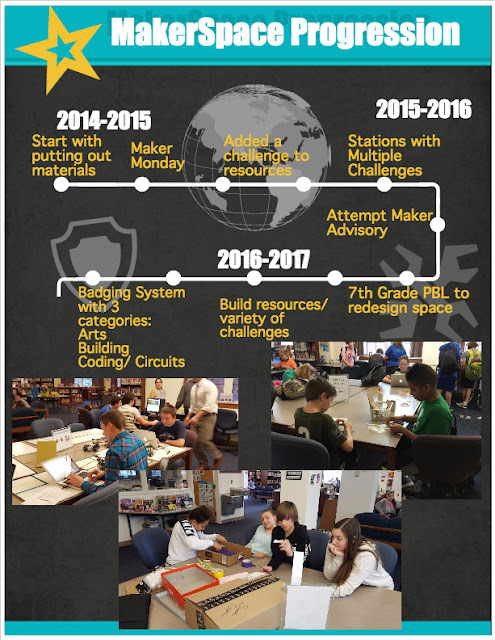 The progression in our space is outlined in the Infographic shared here. We have also attempted to incorporate collaboration, and are still working on this element. I would love to have an active MakerSpace Advisory with students, faculty, and community members, but I have not yet been able to figure out the logistics of this kind of group.
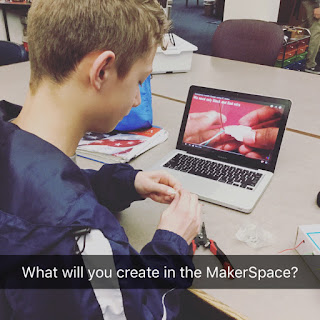
This winter and spring we seem to have reached a tipping point in the MakerSpace though, with students coming to me with project ideas, asking for specific resources and training to be able to engage in making that is meaningful to them.
Our space is beginning to transform, with some of the furniture selected through the 7th grade project, arriving and changing the look of our MakerSpace. The clear drawers of the mobile carts made a big impact, with students feeling empowered to access resources themselves and becoming self directed in their making. I am excited to see it all come together, as the rest of the furniture arrives.
 I am working to keep up with the student requests in the MakerSpace, and to facilitate the self direction of making, by building a Badging System. As I generate new projects I am using a template and project pattern that can become a "Library of Badges". In addition, I have enlisted the help of our technology specialists to build a system for tracking student badges and displaying a MakerSpace Leader Board in the library learning commons. We have been using the language of badging and the Badge Project Sheets for the last few months, as a kind of soft launch to this idea. I am also creating 10 Summer Maker Kits for students to check out over the summer, which incorporate project ideas, materials, and books to explore. The kits, which range from "Fashion Design" to "Music Making" to "Arduino Coding" to "Weaving" will become 10 additional badging options, which can easily be pulled for students to work on
 independently during the year as well. Inside each kit are 3-4 project challenges or ideas, with basic materials to get started, and links to additional resources. These kits and badges will be launched full force over the summer and into the fall. I needed to generate enough options to make it sustainable before bringing it to students. My hope is that this will add motivation to complete and share projects as students catch a vision for the MakerSpace Leader Board.
 My next focus and challenge for the MakerSpace will be getting an
Advisory group off the ground. My first priority is to get students engaged in the planning and direction of this space, but I would also love to have faculty and community members involved. There is such a wealth of knowledge and skills that I would love to see shared with our students. In addition I am looking for opportunities to add a global purpose to our making. I would love to find "real" challenges and problems that our students could be working on during their time in the learning commons.
The possibilities with MakerSpace are endless, which is so exciting, but can also become overwhelming. It has been so important for me to explore what others are doing, glean ideas, and be inspired by all the making happening out there. I attended the NY State Maker Summit in Albany this spring, which was a great opportunity. I continue to spend hours on Pinterest gathering ideas and inspiration, and am constantly encouraged by the blogs of other librarians and makers. Through the resources for this project I will be adding #makered to my Tweet Deck to use as another resource.
 The progression in our space is outlined in the Infographic shared here. We have also attempted to incorporate collaboration, and are still working on this element. I would love to have an active MakerSpace Advisory with students, faculty, and community members, but I have not yet been able to figure out the logistics of this kind of group.
This winter and spring we seem to have reached a tipping point in the MakerSpace though, with students coming to me with project ideas, asking for specific resources and training to be able to engage in making that is meaningful to them.
Our space is beginning to transform, with some of the furniture selected through the 7th grade project, arriving and changing the look of our MakerSpace. The clear drawers of the mobile carts made a big impact, with students feeling empowered to access resources themselves and becoming self directed in their making. I am excited to see it all come together, as the rest of the furniture arrives.

 I am working to keep up with the student requests in the MakerSpace, and to facilitate the self direction of making, by building a Badging System. As I generate new projects I am using a template and project pattern that can become a "Library of Badges". In addition, I have enlisted the help of our technology specialists to build a system for tracking student badges and displaying a MakerSpace Leader Board in the library learning commons. We have been using the language of badging and the Badge Project Sheets for the last few months, as a kind of soft launch to this idea. I am also creating 10 Summer Maker Kits for students to check out over the summer, which incorporate project ideas, materials, and books to explore. The kits, which range from "Fashion Design" to "Music Making" to "Arduino Coding" to "Weaving" will become 10 additional badging options, which can easily be pulled for students to work on
 independently during the year as well. Inside each kit are 3-4 project challenges or ideas, with basic materials to get started, and links to additional resources. These kits and badges will be launched full force over the summer and into the fall. I needed to generate enough options to make it sustainable before bringing it to students. My hope is that this will add motivation to complete and share projects as students catch a vision for the MakerSpace Leader Board.
Advisory group off the ground. My first priority is to get students engaged in the planning and direction of this space, but I would also love to have faculty and community members involved. There is such a wealth of knowledge and skills that I would love to see shared with our students. In addition I am looking for opportunities to add a global purpose to our making. I would love to find "real" challenges and problems that our students could be working on during their time in the learning commons.
The possibilities with MakerSpace are endless, which is so exciting, but can also become overwhelming. It has been so important for me to explore what others are doing, glean ideas, and be inspired by all the making happening out there. I attended the NY State Maker Summit in Albany this spring, which was a great opportunity. I continue to spend hours on Pinterest gathering ideas and inspiration, and am constantly encouraged by the blogs of other librarians and makers. Through the resources for this project I will be adding #makered to my Tweet Deck to use as another resource.
Wednesday, May 3, 2017
Social Reading and "Book Stuff"
Good Reads
I have been a member of Good Reads for quite some time, but I haven't been faithfully using it for the past year. So many great tools and ideas, and so little time! This topic encouraged me to get back on and explore Good Reads though. I updated my books read shelf, which I appreciate having gathered. Sometimes it can be quite challenging to remember the titles of books I read recently. Maybe this is a sign that I am getting older, but I can definitely see myself using this shelf to recommend titles to students...if I can remember to keep it updated!
I also added a widget to my website (like the one below) with my latest "Good Reads" activity, which could help me remember to keep it updated also. I like the transparency as well, and hope it gives me some accountability to keep reading and sharing what I read.
Social Media "book chats"
I love #2jennsbookclub!! I joined my first discussion last April, and had a blast. They have such thoughtful questions, and I always love the opportunity to connect and collaborate with other librarians and readers. The format of these Twitter chats is both engaging and overwhelming- I love the interaction, but sometimes the timing is difficult and the speed of posts makes it hard to keep up.
 I wanted to try something like this with my book club, so I created a question image for our April book selections and shared it through different social medias that I use (Twitter, Facebook, Instagram, Snapchat) using our hashtag #LGreads. I haven't gotten responses yet, but I hope to encourage this at our next meeting- perhaps modeling it during the meeting itself and then following up. Our book group includes both junior and senior high students, so their experience with social media varies drastically. In addition I created a book group within Good Reads, and included this discussion question there as well, for students who do not use social media at all, which I have several.
I am also going to open this up to the larger school community with an online discussion comparing the book 13 Reasons Why and the Netflix show, while that is still a big topic of discussion. I am hoping to launch that within the next two weeks.

Reading Resources
Epic Reads is a resource that I use often, and the one I find most familiar to my readers. This website is truly designed with teens in mind and seems to appeal to them. They gravitate towards the format presented there, and sometimes share it with me. Because of that, I try to stay familiar with what they are sharing and promoting. While exploring it again during this project I discovered that you can create an account. I haven't found the benefits of this account yet, but will continue to check back on what is new, and what I can provide my students through this resource.
Library Reads was new to me, but I like the idea of hearing from other librarians on what is new each month, and keeping up to date on what is happening in the publishing world. This is always a challenge, and anything to help along the way is appreciated. I subscribed to their newsletter, and look forward to receiving their updates.

Subscribe to:
Posts (Atom)